

Customer Reviews With Photos
was super doubtful about buying this product, but I researched a bit and felt if anything, the thermal part was worth it. Glad I got it. The thermal works pretty darn well. I know nothing about night vision and just wanted this for recreation and goofing around, and it’s perfect. The digital night vision/IR part works well too. If you’re not concerned about IR signature, then it’s great. I paired it with an IR torch I have and could see to the end of my neighborhood bright as day. Construction seems good, not particularly rugged, but good enough for most usage. Instructions were clear, device fired right up and I was able to use it pretty quickly. Again, I cant stress enough the thermal is the outstanding feature, along with the hardware included to get you set up very nicely. Cant speak to battery life but its held its charge well. Would purchase again.

Item is solid and can be used for multiple use. I purchased this for camping to organize my cooking gear. Material is strong and won't fall apart. Comes with two dividers to help separate items.

My husband bought a set of these to use on his truck and I thought it would work well to store my winter tools instead of having them roll around on the floor. I have a molle seatback panel and mounting these was extremely easy, all that was needed was an allen wrench. Once mounted to the panel, I am able to remove and place my tools back in a matter of seconds. It works out perfectly for my scenario and cleans up the floor. I am already thinking of other ways to use them!

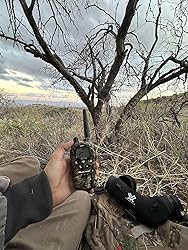
Neck angle was not taken into consideration so I need a straight it’s just hard on our neck looking down. They were used 2024 rifle deer east of Tucson az snowed a bunch but these were still amazing with the snow. I loved them I archery hunt and spot and stalk and this little guy is all I need when I’m moving 100 yards at a time with my tripod.
The Vortex rings seem to be good quality and fit the 1913 Picatinny rail well. For the price, I feel the rings should have been spotless and ready to install, however they needed to be scrubbed clean, as they had green marking on the top and sides of the rings.

It’s is a bit over whelming when you get it but easy to figure out once you play with it. As you can see it is very dependable when zeroing and sighting in. Great quantity for the money as well. If you can find it under $400 its a steal!

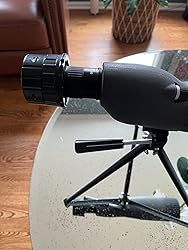
Very impressed with WiFi eyepiece! It was very easy to get up and running The picture quality is very good. I was testing this out on an inexpensive spotting scope on a gray dreary day through a window and the images are still pretty good. One image isn’t 20x and the last is at 60x So far very happy with this unit.
Absolutely fantastic. Lived up to my expectations. Small, accurate. Simple setup. Put it on a stool in a snow-covered field and shot over it today with my pistol in 20 degree weather. Easy to read display. My old chronograph was hard to set up, shoot between the hoops and sunshades. It's going in the trash. Yes. It's pricey. Worth it? Yes. Keep an eye out for sales.

I purchased this to upgrade from a 2x monstrum flip magnifier. The rail space is very limited and the 2x fit in very well. I wanted to increase to 4x or 5x (both have the same length listed). The product is listed here as 3.5 inches; it is actually just over 4 inches. As a result it doesn't fit where I intended. Frustrating because monstrum does not list dimensions on their website, nor did they respond to an inquiry, and this listing is wrong. I expect that the quality of this optic is just as good as my 2x (good). I'll likely have to settle for the 3x, which is shorter, or shop another brand.

The Moultrie Edge 2 Cellular Trail Camera boasts impressive features like Auto Connect Nationwide 4G LTE, 36MP photos, 1080P HD video with audio, a 100 ft detection range, and low-glow flash, making it a solid choice for capturing wildlife. However, the lack of an SD card for local storage is a major drawback, as it forces reliance on cellular connectivity. Additionally, the subscription is relatively expensive, and the absence of a free trial is disappointing. A trial period would let users evaluate the quality of images and videos before committing to the cost. While the camera has great potential, these issues diminish its overall value.

Just received it. Easy setup and good option for gun safe keeping in the bedroom.

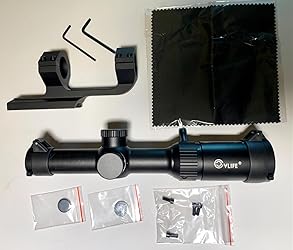
I like this scope very much. It is light weight, aluminum body, and turret covers. The glass is clear and the illuminated crosshairs are easy to adjust from dim to extra bright for daylight use. Mounting was a breeze, but an easy to follow instruction manual is included, with nice graphics. Everything needed for mounting was included, cantilevered scope mount with extra screws, Allen wrenches, and spare batteries, and a lens cleaning cloth. An excellent choice at this price. I would recommend it.
I paid full price for a new magnifier to mate with my new RDS Pro V2 on my Tavor X95. I received a used 4X floating in the box unattached from the rail and with fingerprints on it. I've completely list my trust in Meprolight and am shipping both back to ngclab.com, I'll buy the Holosun.

I recently purchased the spotting scope from Wosports, and I must say, it has exceeded my expectations in every way possible. Designed with the needs of hunters and outdoor enthusiasts in mind, this spotting scope is great. One of the standout features of this scope is its impressive 85mm objective lens, which delivers exceptional clarity and brightness, even in low-light conditions. This generous lens size, coupled with the ability to adjust from 25 to 75 power, ensures that no detail goes unnoticed, whether I'm scanning distant landscapes or tracking elusive game. The scope comes complete with a range of accessories that further enhance its functionality and versatility. The included carrying case provides convenient portability, while the phone adapter allows for easy smartphone integration, allowing me to capture stunning images and videos directly through the scope. Additionally, the compact tabletop tripod offers stability and support when viewing from a fixed position. I particularly appreciate the thoughtful design touches, such as the individual lens covers that help protect the delicate optics from dust and scratches. The focal adjustment mechanism is smooth and precise, allowing for effortless fine-tuning to achieve the perfect focus every time. Overall, I couldn't be more pleased with my purchase of the Wosports spotting scope. Its exceptional optical performance, robust build quality, and comprehensive accessory package make it an indispensable tool for any outdoor enthusiast. Whether you're hunting, birdwatching, or simply enjoying the great outdoors, this spotting scope is sure to enhance your experience. Highly recommended!

Hi all. I don’t typically review products, but in this case, I feel consumers need to be warned especially since Spartan support, in my opinion, either refuse to see they are wrong or just do not care. I will attempt to quickly summarize the issues from the last month with this camera here and provide all of the details after for those that want them. The main point of this review is to warn folks that there is a bug in the multi-carrier GoLive camera (might be all multi-carrier versions) which results in the data usage bar not getting updated until the end of the billing cycle for these cameras and even though this can mislead you and / or prevent you from taking action to adjust the camera in an attempt to stop the data usage, they (Support and Mgt.) will not refund you. Even though they have known about this issue for a while, there is no warning on the site, no warning in the app, no warning when you register the camera, etc. The more concerning issue I ran into while dealing with the above data usage one, is that the website and app. settings seem to have gotten out of sync with the camera’s. It appears this resulted in a missed disable of PIR trigger (stop capturing / sending data) so a LOT more data was used after I disabled it. It seems setting the camera to photo + video and only 1 a day has stopped it (I expected to get 1 a day, but not seeing that which is what setting PIR to Off typically does). Per the command history on the site and app, PIR should be set to “High” as of the 6th however, the site and app. have shown that it is “Off” since. I have provided screen shots and logs proving my case to support and support mgr. Even though they too point out that command history shows PIR getting enabled on the 6th and I show a screen shot of the website as of 3/12 showing it is Off as well as a screen shot showing videos getting sent well after a the screen shot showing PIR = “Off”, they will NOT remove the data to be charged at the end of this billing cycle. In fact, the Support mgr. has told me no less than 5 times that this is my fault since I didn’t upgrade my data plan. Not sure how my data plan plays into the website and app. giving misleading info or not. My next step is filing a complaint with the Better Business Bureau. You might want to review “Spartan Camera” there before making a purchase. Not great. More details… I have used their GoCam for approx. 2 years now and it has worked well so when the need to monitor a remote area arose, I figured Spartan was the perfect choice since I already had a data plan and could add the camera to it for minimal cost. I saw the GoLive camera and liked the feature set especially the multi-carrier option since the area it will monitor is remote and I never know which carrier will work from month to month. I received the camera and set it up on 2/16 and started monitoring it expecting that I would need to tweak it here and there. I have the 500MB plan so I expected an overage to occur while I adjusted the settings or possibly upgrade the plan to a larger one depending on what I found. I set the camera like my GoCam which is to send videos only. Not seeing a ton of triggers, I figured I’d let this run for a day and using Spartans website or app. see what the data usage is and adjust from there. This is what I did with my other camera and it has been reliable so saw no reason not to use the same process here. Knowing that it is cell data I understand that there will be a delay in usage being reflected on Spartans website or application. The first day passes so I have a look at the data usage bar on the Spartan site and see less usage than what I expected. The bar was showing something like 56% of the 500MB. If I remember correctly, this was an increase of 3 – 5%. My first thought was that maybe my expectations of data usage were too high. I then thought that maybe they had implemented compression like my surveillance cameras which results in an amazing reduction in image size. Days pass with little movement in the usage bar and then the end of the billing cycle hit and the bar now shows 467% usage! The real kicker here is that Spartan admitted that they have a bug on the multi-carrier GoLive camera (might be any multi-carrier camera) that results in the data usage not being reflected until billing cycle end. Spartan’s response to this is that since I used the data and the images were sent properly, they will not refund me. They did roll back usage twice while we “discussed” this, that was a small amount of what their misleading site and app. cost me. Since they were unwilling to refund previously used data, I turned the trigger (PIR) on and off a couple of times for a short period to generate data usage so that I could start capturing screen shots, logs, etc. to build my case by getting proof of what was going on since this was going to turn into a battle. I had finished getting my data sometime Thur. 3/7 and turned PIR off to stop data usage. The morning of 3/8, I was still getting videos here and there so I logged into the Spartan site to verify I had indeed turned PIR off and the site showed that I had. I continued to get a few videos so once again verified that the website showed everything was off and it was so, I replied to the ongoing email with support and explained that while everything is off, the camera was still sending videos so it seems they have another issue. I thought this might be a result of them working on the usage issue or data roll back, etc... At this point, there had only been a few videos sent. The next morning, 3/9, I had some work to do in the area of this camera. I looked at what the camera had done overnight and no new videos sent. Every other night when the camera was enabled, there was at least one trigger so I expected it was off as intended. I still took a look at PIR and it showed Off. Went on my way to the area where the camera is to do the work I had to do. Shortly after getting back home, the videos started ROLLING in so I logged into the site and everything is STILL off. In another attempt to stop data usage, I set the camera via the website to photo + video as well as setting the limit to 1 per day and resolution to lowest possible just in case it continues to trigger until I get back there to remove the batteries. This appears to have stopped it. In pleading my case about this new more concerning issue, support pointed out that the command history shows that the last PIR setting change made was from Off to High. Even though this proves my point that a command got dropped resulting in the website / app. thinking / displaying PIR is Off, the data is still my responsibility… Support Mgr. once again telling me in email that they told me to upgrade my data plan and I didn’t so this is fault. I’ve worked in the tech arena for 30+ years and have never seen a technical bug / issue resolved with a data plan upgrade. I’m so SHOCKED at how Spartan can’t see that incorrect information shown on their website and app. led me to believe that the camera had been disabled resulting in a ton more data usage that I feel they are just refusing to see it. There have been calls and daily emails over the last few weeks around these issues all resulting in Spartan only accepting responsibility for the data usage bar not reflecting multi-carrier camera data usage, but not the cell data charges those issues caused by providing false information. They did roll back about $40 of data, but none that I had been charged for (usage bar issue) or will be charged for next month (camera not off when site and app show they are). Below is the command history showing PIR should be set to High. See images to see that site and app. show Off. Action Date Requested Date Completed Status Camera Message Request Update Settings 2024-03-09 14:47:28 2024-03-09 14:47:42 Complete (4) Wireless Settings-Send Photos : Y --> N Daily Limit : 1 Request Update Settings 2024-03-09 14:37:15 2024-03-09 14:37:31 Complete Camera Mode : V --> PV Thumbnail Size : 1376 --> 800 Request Update Settings 2024-03-06 15:44:35 2024-03-06 15:44:49 Complete (2) Trigger Settings-Sensitivity : O --> H Request Update Settings 2024-03-06 15:32:30 2024-03-06 15:32:44 Complete (2) Trigger Settings-Sensitivity : N --> O Request Update Settings 2024-03-06 15:06:45 2024-03-06 15:06:59 Complete (2) Trigger Settings-Sensitivity : O --> N Thank you for your time.
